
Understanding the daily credit refresh process
We understand it can be concerning when you open Volnyn expecting your daily refresh credits and don’t see them. These credits are part of your plan’s daily allowance, and we want them to show up reliably.
On most Free and paid plans, Volnyn refreshes your daily refresh credits every day at 00:00. The exact daily amount depends on your plan (for example, Free typically refreshes to 100). Daily refresh credits are for that day and reset on the next refresh — they do not stack as an unused daily balance.
A short delay after midnight is normal. Refresh the page, or sign out and back in, then check again.
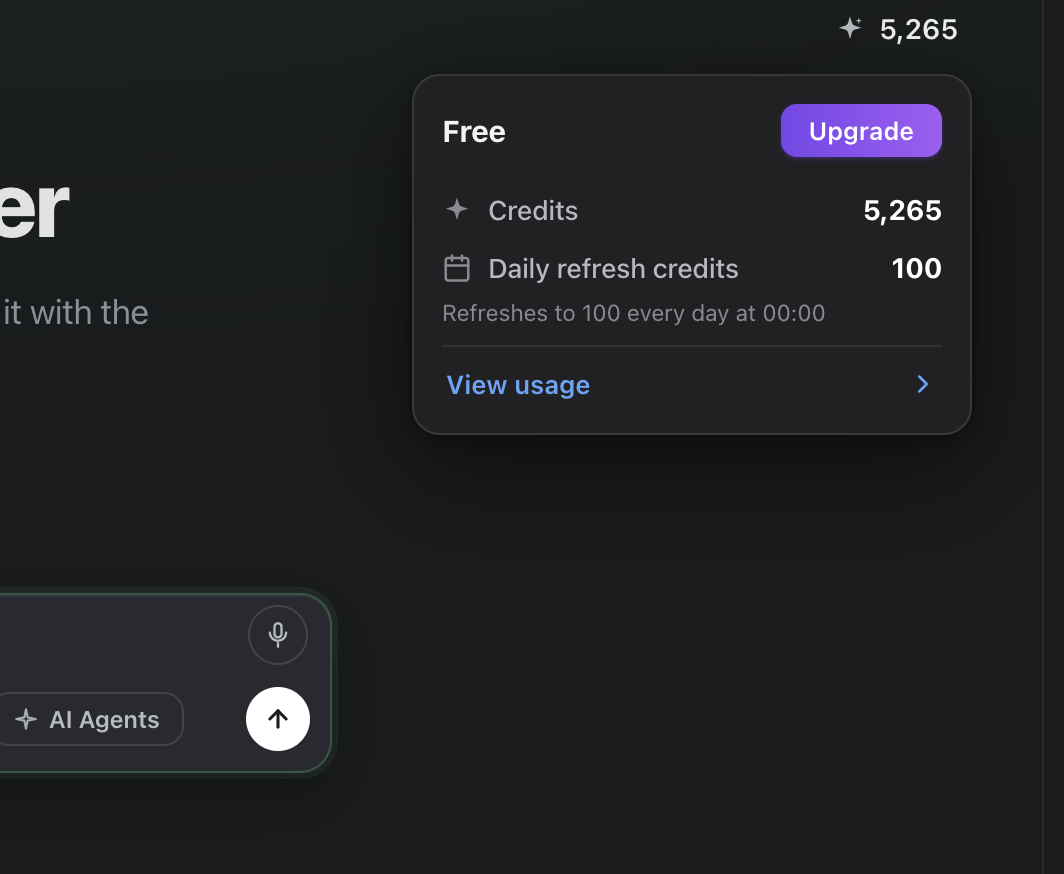
In the chat header, open the credits pill (spark icon + balance). The popover shows:
- Your plan name
- Total Credits
- Daily refresh credits and the note Refreshes to … every day at 00:00
- View usage for a fuller breakdown
Why credits may seem to be missing
Daily refresh credits are often used first when you run tasks. If you already chatted, generated media, or ran an agent after midnight, your daily allowance may already be spent even though your total credit balance still looks high.
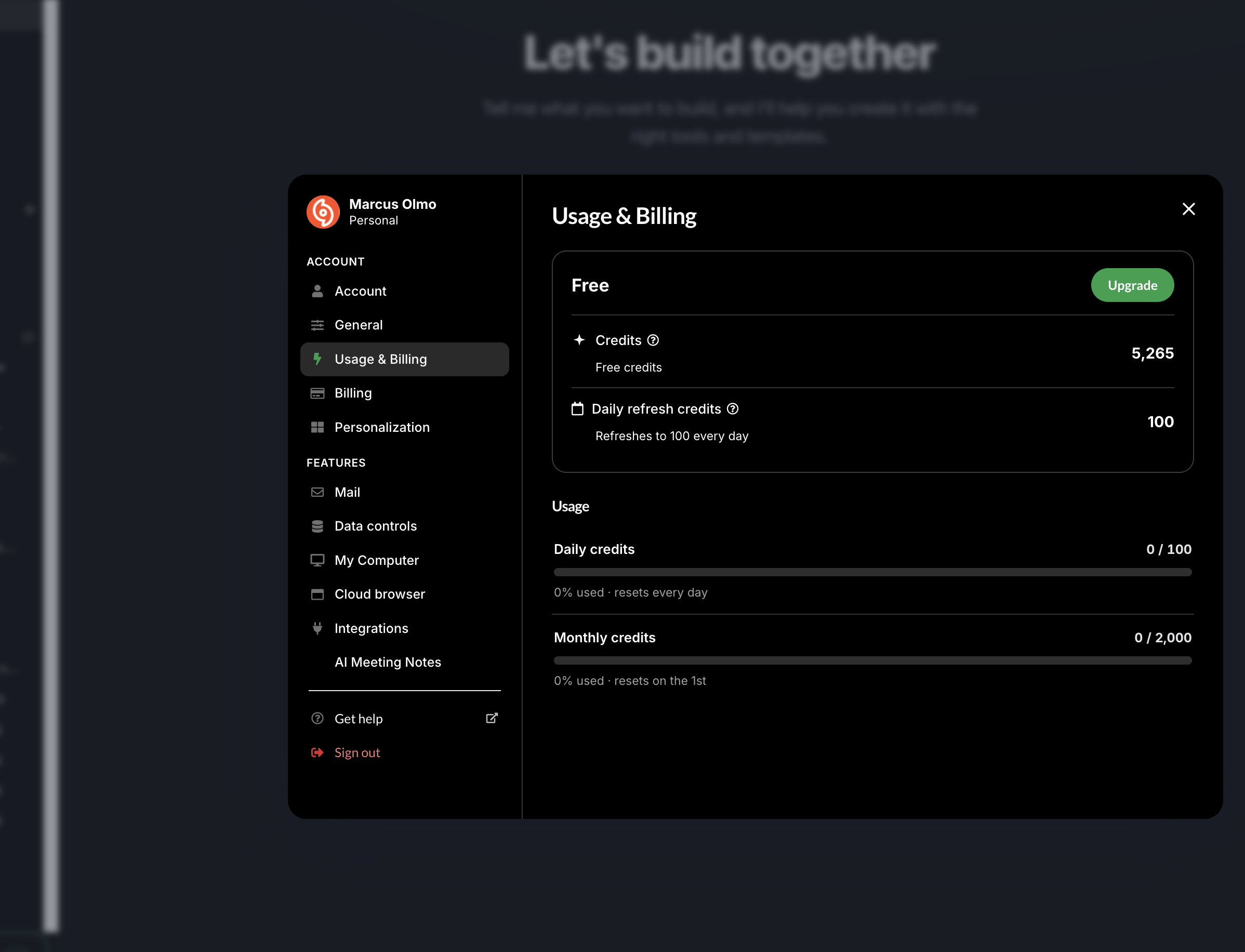
Also check Usage & Billing:
- Click the credits pill in the top bar
- Choose View usage, or open account settings → Usage & Billing
- Confirm Daily refresh credits and the daily usage bar (for example
0 / 100· resets every day)
Daily refresh increase/decrease lines may not appear the same way as other entries in credits history. That does not always mean the refresh failed.
What to do if you are sure credits did not refresh
- Wait a few minutes past 00:00, then hard-refresh the page
- Sign out and sign back in
- Open the credits popover before starting a new chat, and note the Daily refresh credits value
- Open Usage & Billing and check the daily usage bar
If it still looks wrong, contact support with:
- Your account email
- A screenshot of the credits popover or Usage & Billing panel (as above)
- Your device’s system clock visible in the same screenshot (or a second photo of the clock)
That helps us verify timing against the refresh schedule.
Common questions
How do I claim my daily credits?
You do not need a separate claim button. Daily refresh credits apply on the daily schedule for your plan. Open the credits pill to confirm the amount.
Why might my daily credits not appear?
Timing delays, credits already spent on tasks after refresh, or needing a refresh/sign-in are the usual causes.
Will daily credits show up in usage details?
Total balance and the daily allowance appear in the credits popover and Usage & Billing. Individual daily refresh lines may not list like other usage events.
Can there be delays?
Yes — slight delays after 00:00 are expected. Wait a few minutes and recheck.
Why were my daily credits used right away?
Tasks after refresh consume daily credits first. Check usage before starting a new conversation if you are troubleshooting.
Related articles
- What are the rules for credits consumption? And how can I obtain them?
- Will my daily refresh credits accumulate or reset?
- Where can I check my credit consumption/usage?
- What is the current membership pricing for Volnyn?
- What happens to my credits after canceling or letting my Volnyn subscription expire?